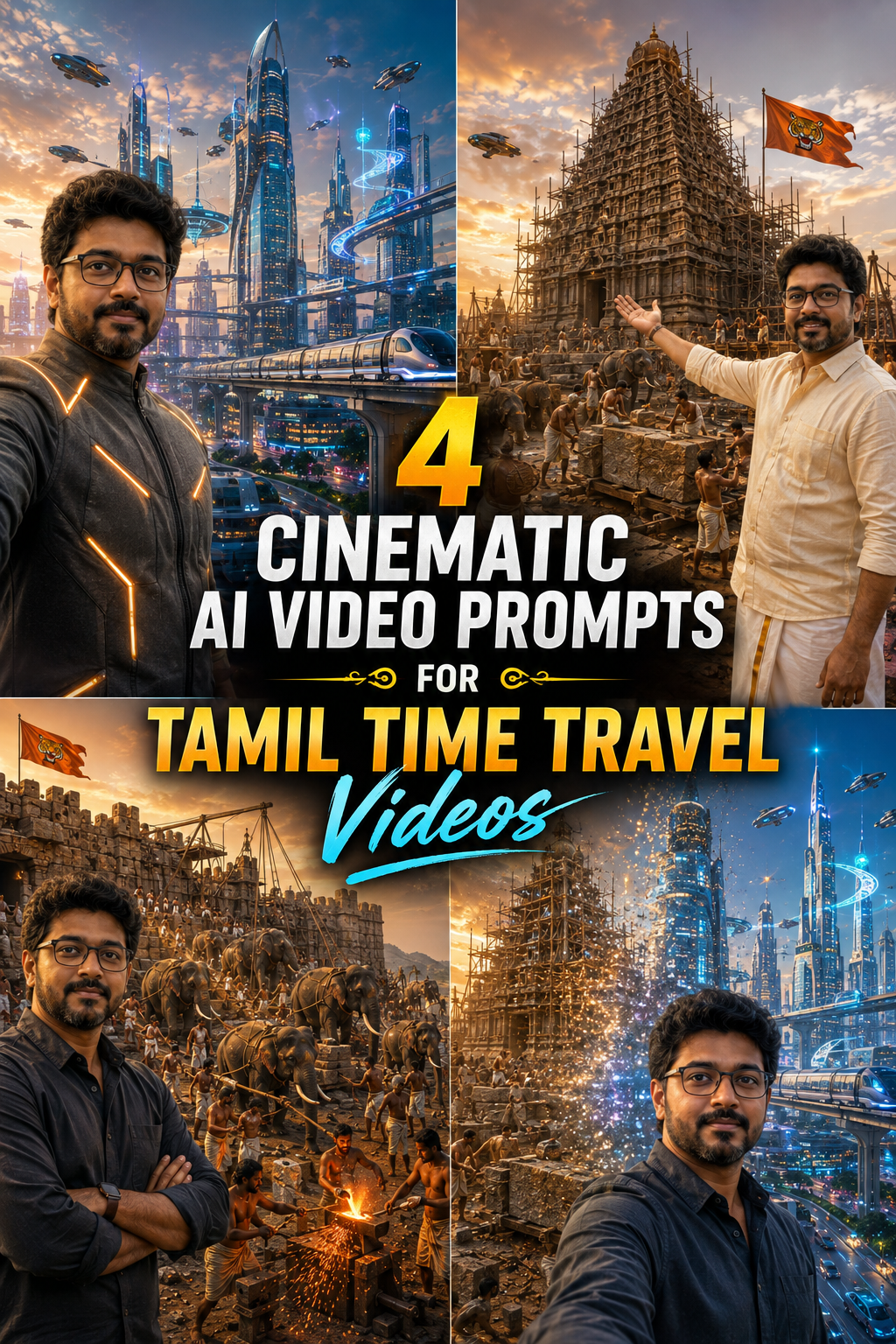
AI video generation becomes much more useful when the prompt defines the subject, camera, environment, dialogue, movement, lighting, continuity, and forbidden elements with enough precision. The four examples below demonstrate that approach through Tamil cinematic storytelling, historical reconstruction, futuristic world-building, and a controlled time-travel transition.
These examples are designed as complete generation prompts. They preserve exact dialogue, camera constraints, scene requirements, visual details, and negative constraints so the generated video has a clear target.
What These AI Video Prompts Cover
Futuristic Chennai in 2124, with a Tamil-speaking presenter overlooking a large-scale sci-fi city.
Thanjavur in 1008 CE, with the Brihadeeswarar Temple under construction and Chola-era workers.
An enormous ancient South Indian hill-fort construction site filled with workers, elephants, stonework, forges, and cranes.
A seamless transformation from an ancient Indian temple construction site into futuristic Chennai in 2124.
Prompt 1: Futuristic Chennai in 2124
The first example places a Tamil-speaking presenter in Chennai in the year 2124. The prompt combines a fixed presenter position with a large futuristic environment that remains visible throughout the 10-second shot.
Why the framing matters
The presenter remains in the left third of the frame and occupies no more than one third of its width. This leaves most of the image available for the futuristic city. The camera behaves like an invisible floating camera at selfie distance, without showing a selfie stick, arm, or hand.
The prompt also prevents common continuity problems by explicitly prohibiting close-ups, zooming, and cuts.
Complete Futuristic Chennai Prompt
Vertical 9:16, 10-second cinematic video, single continuous shot,

photorealistic, futuristic sci-fi city.

SUBJECT: A man speaks Tamil directly to camera. FUTURISTIC COSTUME: a
sleek charcoal-grey high-collar jacket with subtle glowing amber accent
lines on the shoulders and chest, minimal modern cut, futuristic but
elegant — no helmet, face fully visible, wearing his regular black
rectangular glasses.

FRAMING (strict): He stands in the LEFT THIRD of the frame, visible
only from chest up, occupying no more than one third of the frame width.
The futuristic city must dominate the rest of the frame and stay clearly
visible for all 10 seconds. Camera is at selfie distance but appears as
an invisible floating camera — NO selfie stick, NO visible arm holding
anything, NO hand in frame edges. NO close-ups, NO zoom-in on face, NO
cuts.

VOICE (he speaks in Tamil, amazed, building excitement, natural Tamil
pronunciation): "மக்களே... இது கனவு இல்ல! நான் இப்போ நிக்கறது 2124-ஆம்
வருஷம் சென்னை! Time travel பண்ணி futureக்கு வந்துட்டேன்! இங்க பாருங்க — எல்லாமே மாறிடுச்சு!"

SETTING: Chennai in the year 2124, early evening golden-blue hour. He
stands on an open elevated sky-deck platform overlooking the city.
Behind and around him: gleaming hi-tech skyscrapers with curved glass
and garden terraces, soft glowing window lights, layered transparent
sky-bridges connecting towers, streams of flying vehicles moving in
organized aerial traffic lanes at different heights, a sleek elevated
maglev train gliding silently on a glowing guideway between buildings,
large soft holographic light projections floating between towers
showing abstract shapes and patterns (NO text of any language on any
hologram, sign, or building), drones moving in the distance, clean wide
multi-level roads far below with autonomous vehicles.

ATMOSPHERE: futuristic but warm and optimistic — not dark dystopian.
Gentle breeze moving his jacket slightly, lens flares from city lights,
light haze giving depth between building layers.

FORBIDDEN: no selfie stick, no visible arms holding camera, no text or
letters anywhere in the scene, no temples, no old buildings, no dark
dystopian mood, no rain, no subject covering more than one third of
the frame.

COLOR: golden-blue evening gradient sky, warm amber building lights
against cool teal-blue dusk, soft neon glows (amber, cyan, white),
cinematic sci-fi color grading, clean and premium look.

PRONUNCIATION RULE (strict): The year "2124" must be spoken fully in
Tamil words as "இரண்டாயிரத்து நூத்தி இருபத்தி நாலு" (pronounced:
"irandaayirathu noothi irubathi naalu"). Do NOT say the year in
English, do NOT say it digit by digit, do NOT say "twenty one
twenty four".
Prompt 2: Thanjavur in 1008 CE
The second example shifts the setting from futuristic Chennai to Chola-era Thanjavur. The presenter wears a white cotton veshti and cream shirt while the background shows the construction of the Brihadeeswarar Temple.
Historical detail inside the prompt
The temple description specifies the tall pyramidal granite vimana, its thirteen horizontal tiers, miniature architectural elements, octagonal cupola, giant capstone, golden kalasam, square sanctum, carved granite walls, guardian sculptures, and bamboo scaffolding.
The prompt also specifies the appearance of the Chola flags. The animal must be a striped royal Bengal tiger rather than a lion. This is an example of using explicit visual constraints when a particular historical symbol matters to the scene.
Complete Thanjavur Prompt
Vertical 9:16, 10-second cinematic selfie video, single continuous shot.

SUBJECT: A man speaks Tamil directly to camera, wearing a crisp white
cotton veshti (dhoti) and a light cream half-sleeve cotton shirt. He is
a modern presenter standing in 1008 CE.

VOICE (he speaks in Tamil, energetic, building excitement, natural
Tamil pronunciation): "மக்களே... நான் இப்போ நிக்கறது 1008-ஆம் வருஷம்!
ஆமா, ஆயிரம் வருஷம் பின்னாடி போயிட்டேன்! என் பின்னாடி பாருங்க — தஞ்சை
பெரிய கோவில், இப்போ தான் கட்டிட்டு இருக்காங்க!"

CAMERA RULES (strict): Medium selfie shot at arm's length, chest-up
framing held for the entire 10 seconds. NO close-ups, NO zoom-in on
face, NO push-in, NO cuts. The full temple tower stays visible behind
him from first frame to last frame.

TEMPLE (match the real Brihadeeswarar Temple, Thanjavur, exactly): A
massive, steep, TALL pyramidal granite vimana about 66 meters high —
nearly straight triangular profile, NOT a stepped fat pyramid. Thirteen
slim horizontal tiers shrinking smoothly as they rise, each tier carved
with miniature pavilions, pilasters and deity niches. At the very top,
a single large octagonal cupola (rounded dome-like shikhara) resting on
one giant capstone, crowned with a tall golden kalasam spire. The tower
rises from a large two-storey square sanctum with carved granite walls
and large guardian (dvarapala) sculptures at the entrance. Light
sandstone-beige granite color. Bamboo scaffolding lashed with coir rope
covers the upper tiers.

CHOLA FLAGS (critical): Orange-red rectangular banners showing a
striding ROYAL BENGAL TIGER with bold black stripes on golden-yellow
body, side profile, long tail curved up. It is a TIGER, NOT a lion —
no mane, must have clear black stripes.

ACTION: He gestures proudly toward the temple. Background: Chola-era
workers, bare-chested, wearing only white cotton veshtis and head
cloths, barefoot — chiseling granite blocks with iron chisels and
wooden mallets, carrying stones on shoulders, climbing the bamboo
scaffolding. Stone dust haze in the air.

FORBIDDEN: no modern objects, no machines, no metal scaffolding, no
shirts or footwear on workers, no lions on flags.

COLOR: warm golden-hour sunlight, sandstone beige, granite grey,
terracotta red soil, amber dust haze, cinematic period-drama color
grading.
Prompt 3: Ancient South Indian Fort Construction
The third example focuses on scale. Instead of relying on camera movement to communicate grandeur, the prompt keeps the camera completely static and creates scale through background depth, density, worker activity, elephants, construction equipment, forges, dust, and architectural mass.
Building scale through background activity
The fort contains massive granite walls, battlements, watchtowers, a fortified gateway, wooden cranes, rope pulleys, and stone blocks being positioned throughout the scene.
The prompt then adds multiple layers of activity. Elephants drag granite slabs, push stones, carry materials, and assist with lifting mechanisms. Hundreds of workers pull ropes, move stones, operate levers, work on walls, and break granite.
Open-air forges add another visual layer. Blacksmiths operate bellows, hammer red-hot iron, shape construction tools, and fit iron components into stone joints.
Complete Ancient Fort Prompt
Vertical 16:9, 10-second cinematic video, single continuous shot, NO transitions, NO background changes, NO morphing — one unbroken epic historical scene for the full 10 seconds, photorealistic.

SUBJECT: A man speaks Tamil directly to camera, casual confident
creator energy, wearing a simple modern dark casual shirt, his regular
black rectangular glasses. He stays perfectly consistent and unchanged
for the entire 10 seconds — naturally talking and gesturing.

FRAMING (strict): He stands in the LEFT THIRD of the frame, chest up,
occupying no more than one third of the frame width. Invisible floating
camera at selfie distance — NO selfie stick, NO visible arm, NO hand at
frame edges, NO close-ups, NO zoom-in, NO cuts. The remaining two
thirds of the frame showcase the massive fort construction scene
behind him.

VOICE (he speaks in Tamil, confident, friendly, hook energy,
natural
Tamil pronunciation): "இப்போ இந்த மாதிரி AI வீடியோ தான் ட்ரெண்டிங்!
இந்த மாதிரி வீடியோ எப்படி பண்றதுனு தெரிஞ்சிக்க link-னு கமெண்ட் பண்ணுங்க,
tutorial link உங்களுக்கு அனுப்புறேன்!"

BACKGROUND — EPIC ANCIENT FORT CONSTRUCTION (continuous, full 10
seconds, no change):

The entire background is a breathtaking, enormous ancient South Indian
hill-fort under construction, circa 1600s — a colossal military
fortress being raised from raw rock and earth. The scene is packed with
raw, intense labor at a staggering scale:

THE FORT: Massive thick granite fortress walls rising to enormous
height, some sections already completed with battlements and
watchtowers visible, other sections still rising with rough-cut stone
being added layer by layer. A huge fortified gateway arch is being
assembled in the mid-ground with giant carved stone blocks being
hoisted into position using wooden cranes and rope pulleys. The walls
stretch deep into the background, curving along the terrain, showing
the sheer enormity of the fortification.
ELEPHANTS (many, prominent): At least 10 to 12 large powerful Indian
elephants dominating the scene — several elephants in the foreground
dragging massive granite slabs on wooden sledges with thick braided
ropes, two elephants using their trunks and heads to push enormous
stone blocks into position against the wall base, a line of elephants
carrying heavy cut stones in wooden cradles on their backs walking
slowly up a wide earthen ramp toward the wall top, one elephant
pulling a heavy wooden crane mechanism to lift a stone block high
onto the wall. The elephants are fitted with sturdy leather and rope
work harnesses, bronze forehead plates, and iron chain links. Their
immense power is visible in every strained movement.
WORKERS LIFTING STONE (huge numbers): Hundreds of muscular
bare-chested workers in white cotton veshtis and headwraps — massive
teams of 20-30 men heaving together on thick ropes to drag giant
stone blocks, long lines of workers passing cut stones hand-to-hand
up the earthen ramp, groups of 8-10 men using wooden levers to pry
and position heavy blocks into the wall, workers on top of the wall
pulling stones up with rope-and-pulley systems, men carrying large
rough stones on their shoulders and heads. Every part of the frame
is filled with people straining, pulling, lifting, carrying.
WORKERS BREAKING STONE (visible, intense): In the foreground
and mid-ground, groups of stone-breakers smashing heavy iron hammers and
chisels into raw granite boulders, splitting them into construction
blocks. Stone chips and dust fly with each strike. Workers use iron
wedges driven into drill holes to crack massive rocks apart. The
raw physical force of the stone-breaking is dramatic and visceral.
FIRE AND STEEL WORK (prominent): Multiple open-air forge stations
visible with blazing orange fires — blacksmiths pumping large
leather bellows sending sparks flying, hammering red-hot iron on
heavy stone anvils to shape chisels, wedges, clamps, and iron
brackets for the fort walls. Glowing molten metal visible in clay
crucibles. Workers heating iron clamps in the fire and then fitting
them into stone joints to lock blocks together. Thick smoke and
orange firelight mixing with the dusty golden sunlight, creating
dramatic atmospheric depth.
GROUND LEVEL DETAILS: Mountains of rough-cut granite blocks and raw
boulders, scattered iron tools and broken chisels, wooden rollers
and sledges, coiled heavy ropes, piles of iron clamps and brackets,
ox-carts arriving with fresh stone from quarries in the distance,
water bearers carrying earthen pots to workers, dust clouds rising
from every surface.
ATMOSPHERE & LIGHT: Intense warm golden-hour sunlight cutting through
thick dust and forge smoke, dramatic volumetric light shafts,
sparks from forges catching the light, fine stone dust hanging in
the air creating a hazy epic atmosphere. Saffron and red kingdom
banners with a royal emblem flutter on tall wooden poles along the
completed wall sections. The overall mood is raw, powerful, and
awe-inspiring — the primal energy of an empire building its
mightiest fortress.
SUBTLE MOTION (continuous life): Workers constantly in motion
— hammering, pulling, lifting, carrying. Elephants lumbering forward
under heavy loads. Forge fires flickering and sparks flying. Dust
drifting through shafts of light. Banners swaying. The scene feels
intensely alive with organized, massive-scale ancient construction
energy.

CAMERA: Completely static framing — no pan, no tilt, no zoom. The epic
scale is conveyed through the depth, density, and intensity of the
background activity, not through camera movement.

FORBIDDEN: no transitions, no background changes, no morphing
effects, no futuristic elements, no selfie stick, no visible arms
holding camera, no text or letters of any language anywhere in the
scene, no changes to the subject's face, clothing or position, no
close-ups, no dark or gloomy mood, no empty or sparse background, no
modern machinery.

COLOR: Intense warm golden-amber tones with fiery orange accents from
the forges — sandstone beige, terracotta, dusty gold, deep bronze
shadows, hot orange forge-glow, with smoky atmospheric haze. Premium
cinematic color grading that evokes the raw power and grandeur of
ancient fortress construction.
Prompt 4: Seamless Transition From 1008 CE to 2124
The fourth example changes the objective from maintaining one world to transforming the world around the presenter. The presenter remains visually consistent while the background moves from an ancient Indian temple construction site to futuristic Chennai.
Controlling the transformation
The transition has defined timing. The first three seconds establish the ancient setting. Seconds three through five perform the transformation. The final five seconds establish the futuristic environment.
The prompt also specifies how the transformation should happen. Stone dissolves into glass and light. Scaffolding morphs into skyscrapers. Dust particles become glowing light particles. The presenter remains unaffected throughout the transformation.
Complete Background Transformation Prompt
Vertical 9:16, 10-second cinematic video, single continuous shot with a seamless background transformation, photorealistic.

SUBJECT: A man speaks Tamil directly to camera, casual confident
creator energy, wearing a simple modern dark casual shirt, his regular
black rectangular glasses. He stays perfectly consistent and unchanged
for the entire 10 seconds — only the world behind him transforms.

FRAMING (strict): He stands in the LEFT THIRD of the frame, chest up,
occupying no more than one third of the frame width. Invisible floating
camera at selfie distance — NO selfie stick, NO visible arm, NO hand at
frame edges, NO close-ups, NO zoom-in, NO cuts.

VOICE (he speaks in Tamil, confident, friendly, hook energy, natural
Tamil pronunciation): "இப்போ இந்த மாதிரி AI வீடியோ தான் ட்ரெண்டிங்!
இது எப்படி பண்றதுன்னு அடுத்த முப்பது செகண்ட்ல சொல்லி தரேன் —
கவனமா பாருங்க!"

BACKGROUND TRANSFORMATION (the key effect):

Seconds 0 to 3: He stands at an ancient Indian temple construction
site, 1008 CE — a massive tall pyramidal granite temple tower under
construction with bamboo scaffolding, bare-chested workers in white
cotton veshtis chiseling granite blocks, an elephant hauling stone in
the distance, warm golden dusty sunlight, orange-red banners with a
striped tiger emblem.
Seconds 3 to 5: The background smoothly and magically TRANSFORMS
around him — stone dissolves into glass and light, scaffolding morphs
into skyscrapers, dust particles turn into glowing light particles,
like time itself fast-forwarding. He remains completely unaffected and
keeps talking naturally.
Seconds 5 to 10: He now stands in a futuristic city in the year 2124,
early evening — gleaming hi-tech towers with curved glass, flying
vehicles streaming through aerial traffic lanes, a sleek maglev train
gliding between buildings, soft abstract holographic light shapes
floating in the air.

The transition must feel smooth, magical and premium — a flowing morph,
not a hard cut, not a glitch effect.

FORBIDDEN: no selfie stick, no visible arms holding camera, no text or
letters of any language anywhere in the scene, no changes to the
subject's face, clothing or position during the transformation, no
close-ups, no dark dystopian mood.

COLOR: starts as warm golden dusty period-drama tones (amber,
sandstone beige, terracotta), gradually shifts during the morph into
golden-blue futuristic tones (teal-blue dusk, amber and cyan neon glow),
cinematic premium grading throughout.
How to Structure a Detailed AI Video Prompt
These examples show a consistent prompt architecture. Each major visual requirement has its own section. This makes the intended result easier to define and gives the video model explicit constraints.
1. Define the format first
Start with the aspect ratio, duration, shot type, continuity requirements, and visual style. The examples use 10-second cinematic videos and explicitly define whether the shot should remain continuous.
2. Define the subject
Specify who appears in the scene, what the person wears, whether glasses or other identifying visual elements remain visible, and how the subject behaves during the shot.
3. Lock the framing
Framing becomes especially important when the presenter shares the frame with a large environment. The source repeatedly uses left-third positioning, chest-up framing, and restrictions on how much of the frame the subject can occupy.
4. Write the spoken dialogue exactly
The dialogue belongs directly inside the prompt. The source examples also define the speaking style, including emotion, energy, and natural Tamil pronunciation.
5. Describe the environment at multiple levels
A convincing environment needs more than a broad label such as "futuristic city" or "ancient fort." The examples specify architecture, workers, vehicles, animals, tools, lighting, atmospheric effects, and background movement.
6. Add explicit negative constraints
The source repeatedly uses forbidden-element instructions. These include restrictions on selfie sticks, visible arms, text, modern machinery, incorrect historical elements, camera movement, unwanted transitions, and inappropriate moods.
7. Define color and lighting
Color instructions help establish a consistent visual identity. The futuristic examples use combinations such as golden-blue evening light, teal-blue dusk, amber, cyan, and white neon. The historical examples use sandstone beige, granite grey, terracotta, dusty gold, bronze, and warm golden-hour light.
8. Specify continuity when it matters
Several prompts explicitly require the subject to remain unchanged. The transition prompt takes this further by allowing the background to transform while the presenter remains unaffected.
When a visual element is critical, describe both what you want and what you do not want. The temple prompt, for example, explicitly distinguishes a royal Bengal tiger from a lion and defines the required stripe pattern.
Camera and Framing Rules Used in the Examples
| Requirement | How the source uses it |
|---|---|
| Subject position | Left third of the frame in multiple presenter-based scenes. |
| Subject size | No more than one third of the frame width. |
| Framing | Chest-up or medium selfie framing. |
| Camera visibility | Invisible floating camera with no selfie stick or visible camera-holding arm. |
| Continuity | Single continuous shot with no cuts in the specified examples. |
| Movement | Some prompts prohibit zooming, push-ins, pans, and tilts. |
| Background priority | The environment occupies most of the frame when the setting is central to the story. |
Historical Detail in AI Video Prompts
The historical examples demonstrate how detailed visual constraints can define a period scene. The Thanjavur prompt specifies the temple architecture, construction materials, scaffolding, worker clothing, tools, flags, sunlight, dust, and forbidden modern elements.
The fort prompt takes the same approach at a much larger scale. It describes the architecture, construction methods, elephants, workers, stone-breaking, blacksmithing, ground-level equipment, atmosphere, banners, and continuous activity.
These details are part of the prompt itself. They should remain together when the prompt is copied into a video-generation workflow.
Creating a Futuristic Chennai Scene
The futuristic example defines Chennai through a collection of environmental details rather than relying on a single futuristic-city description.
- Gleaming hi-tech skyscrapers.
- Curved glass architecture.
- Garden terraces.
- Transparent sky-bridges.
- Organized aerial traffic lanes.
- Flying vehicles.
- An elevated maglev train.
- Abstract holographic light projections.
- Drones in the distance.
- Multi-level roads.
- Autonomous vehicles.
- Golden-blue evening lighting.
- Teal-blue dusk and amber illumination.
The prompt also prohibits text on holograms, signs, or buildings. That constraint is important because the intended scene does not depend on readable environmental text.
Designing Large-Scale Construction Scenes
The ancient fort example demonstrates how to create visual density without moving the camera. The scene uses multiple simultaneous activity layers.
- Massive granite fortress walls.
- Battlements and watchtowers.
- A fortified gateway under construction.
- Wooden cranes and rope pulleys.
- At least 10 to 12 prominent Indian elephants.
- Hundreds of workers.
- Teams pulling ropes.
- Workers passing stones hand-to-hand.
- Workers using wooden levers.
- Stone-breakers using iron hammers and chisels.
- Iron wedges driven into drill holes.
- Open-air forge stations.
- Blacksmiths using leather bellows.
- Red-hot iron and clay crucibles.
- Granite blocks, boulders, rollers, sledges, ropes, tools, and carts.
- Water bearers and quarry transport in the distance.
The camera remains static. The prompt explicitly states that the scale should come from depth, density, and background activity rather than camera movement.
Designing a Seamless Time-Travel Transition
The fourth prompt separates the transformation into three timed phases.
| Time | Scene | Transformation |
|---|---|---|
| 0 to 3 seconds | Ancient Indian temple construction site in 1008 CE. | Historical environment remains established. |
| 3 to 5 seconds | Transformation phase. | Stone becomes glass and light, scaffolding becomes skyscrapers, and dust becomes glowing particles. |
| 5 to 10 seconds | Futuristic Chennai in 2124. | Futuristic towers, flying vehicles, maglev train, and holographic light shapes establish the new environment. |
The presenter does not transform. The world behind him does. The prompt therefore makes subject continuity one of the primary constraints.
Practical Prompt Checklist
- Define the video aspect ratio.
- Define the duration.
- Specify whether the shot is continuous.
- Describe the subject.
- Describe clothing and persistent visual features.
- Define the subject's position in the frame.
- Define the subject's maximum frame coverage.
- Define camera distance and visibility.
- Specify camera movement restrictions.
- Write the exact spoken dialogue.
- Specify voice tone and pronunciation.
- Describe the environment in detail.
- Define important background activity.
- Define lighting and atmosphere.
- Define the color palette.
- List forbidden elements.
- Specify continuity requirements.
- Define transformation timing when a transition is required.
Final Takeaway
These four examples show how detailed AI video prompts can control a presenter, environment, camera, dialogue, historical details, futuristic elements, movement, lighting, and visual continuity within a short cinematic sequence.
The strongest source examples are explicit about the result they want. They define the scene in layers, establish camera constraints, preserve the presenter's appearance, specify spoken Tamil dialogue, and use forbidden-element instructions to reduce unwanted visual outcomes.
The complete prompts above can be retained as reusable source examples for Tamil AI video generation, historical scenes, futuristic world-building, and time-travel transitions.



Comments (0)
No comments yet. Be the first to share your thoughts!
Leave a Comment